
I have been working through a AI training at https://codefinity.com/courses/v2/508f89fc-4a9c-489a-9a42-91a84d72138f. I much prefer to setup and run everything locally rather than use the cloud based options if that is available, so I started down the path of running N8N with NGINX Reverse Proxy using Docker compose.
The directions available from N8N (https://docs.n8n.io/deploy/host-n8n/install-options/install-using-docker-compose) are generally quite good, however I run a modsecurity container (https://hub.docker.com/r/owasp/modsecurity) on every docker host with web based apps. Modsecurity provides WAF (Web Application Firewall) services using either NGINX or Apache. For a system like this, I generally will leave modsecurity disabled for this application (since it is for testing and doesn’t face the internet), but since I already have an ansible setup in place to deploy docker container, create the NGINX proxy config, and check out a certificate from my internal CA, I use the modsecurity container for everything.
The problem I ran into is that using the default docker-compose.yml file, after connecting to the N8N service behinnd NGINX, I was able to log in, but every time I edited a workflow, I saw the offline message: No network connection. Workflow changes will be saved once the connection is restored.
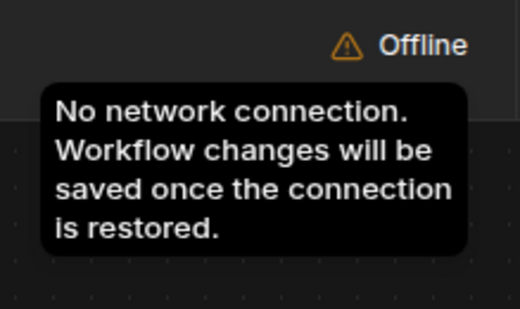
If I revert back to accessing N8N directly on port 5678, the issue goes away. After a LOT of internet searching and a ton of posts without much help, what I discovered is what appears to be a conflict with NGINX common locations I apply to all virtual servers.
My NGINX common locations include the following:
location /healthz {
    {% if not location_common.healthz_acl|default(False) %}
    allow 127.0.0.1;
    allow ::1;
    deny all;
    {% else %}
        {% for acl in location_common.healthz_acl %}
    {{ acl }};
        {% endfor %}
    {% endif %}
    access_log off;
    add_header Content-Type text/plain;
    return 200 "OK";
}

location /metrics/nginx {
    {% if not location_common.metrics_acl|default(False) %}
    allow 127.0.0.1;
    allow ::1;
    deny all;
    {% else %}
        {% for acl in location_common.metrics_acl %}
    {{ acl }};
        {% endfor %}
    {% endif %}
    access_log off;
    proxy_store off;
    stub_status;
}

error_page 500 502 503 504  /50x.html;
location = /50x.html {
    root /usr/share/nginx/html;
}

# allow certbot on all hosts
location ~ ^/.well-known/acme-challenge {
    allow all;
    default_type "text/plain";
    root /var/www;
}

# allow mta-sts.txt on all hosts
location ~ ^/.well-known/mta-sts.txt {
    allow all;
    default_type "text/plain";
    root /var/www;
}
NOTE: This template is deployed via ansible as a Jinja template.
Anytime the NGINX conf file for N8N included the common locations, the offline message pops up after a few seconds. If I remove the common locations, the issue goes away. Since this didn’t really tell me enough about what the real problem was, I dug deeper and found references to adding a N8N_ENDPOINT_HEALTH=health to the environment variables of the N8N container. After adding this, the problem goes away even with my common locations included.
End result, it appears that the /healthz location was conflicting with the N8N health check which caused the websocket to close. If you run into a similar issue, either try removing and alternate locations that could be conflicting with the N8N application, or try adding the N8N_ENDPOINT_HEALTH=health option to your docker compose.
My complete docker compose is listed below. The compose script uses the Postgres database option and includes the endpoint health fix. I also removed the use of docker volume and set the 2 needed mounts to bind to a directory for easier access.
#volumes:  #### volumes moved to mountpoints
#  sandbox-tls:
#  db-storage:

services:
  sandbox-certs:
    image: ghcr.io/n8n-io/n8n-sandbox-service-api:latest
    user: '0:0'
    entrypoint: ['sh', '-c']
    command:
      - >
        bootstrap-mtls.sh --out-dir /tls --api-san sandbox-api
        --control-san-prefix sandbox-runner &&
        chown -R sandbox-api:sandbox-api /tls/api
    environment:
      NUM_RUNNERS: '1'
    volumes:
      - ${N8N_SANDBOX_TLS_MOUNTPOINT}:/tls

  sandbox-api:
    image: ghcr.io/n8n-io/n8n-sandbox-service-api:latest
    depends_on:
      sandbox-certs:
        condition: service_completed_successfully
    environment:
      SANDBOX_API_KEYS: ${SANDBOX_API_KEYS}
      SANDBOX_API_RUNNER_REGISTRATION_TOKEN: ${SANDBOX_API_RUNNER_REGISTRATION_TOKEN}
      SANDBOX_API_RUNNER_API_KEY: ${SANDBOX_API_RUNNER_API_KEY}
      SANDBOX_API_GRPC_TLS_CERT_FILE: /tls/api/grpc-server.crt
      SANDBOX_API_GRPC_TLS_KEY_FILE: /tls/api/grpc-server.key
      SANDBOX_API_GRPC_TLS_CLIENT_CA_FILE: /tls/api/ca.crt
      SANDBOX_API_RUNNER_CONTROL_GRPC_TLS_CA_FILE: /tls/api/ca.crt
      SANDBOX_API_RUNNER_CONTROL_GRPC_TLS_CERT_FILE: /tls/api/control-grpc-api-client.crt
      SANDBOX_API_RUNNER_CONTROL_GRPC_TLS_KEY_FILE: /tls/api/control-grpc-api-client.key
      SANDBOX_API_RUNNER_CONTROL_GRPC_TLS_SERVER_NAME: sandbox-runner-1
    volumes:
      - ${N8N_SANDBOX_TLS_MOUNTPOINT}:/tls:ro
    healthcheck:
      test: ["CMD", "wget", "-qO-", "http://localhost:8080/healthz"]
      interval: 5s
      timeout: 3s
      retries: 5
      start_period: 10s
    # Never publish 8080/9090 to the host on an internet-facing server.
    # n8n reaches this container by service name over the default Compose network.

  sandbox-runner-1:
    image: ghcr.io/n8n-io/n8n-sandbox-service-runner-dind:latest
    privileged: true
    userns_mode: host
    depends_on:
      sandbox-api:
        condition: service_healthy
    environment:
      SANDBOX_RUNNER_API_KEYS: ${SANDBOX_API_RUNNER_API_KEY}
      SANDBOX_RUNNER_REGISTRATION_TOKEN: ${SANDBOX_API_RUNNER_REGISTRATION_TOKEN}
      SANDBOX_RUNNER_API_GRPC_ADDR: sandbox-api:9090
      SANDBOX_RUNNER_HTTP_BASE_URL: http://sandbox-runner-1:8080
      SANDBOX_RUNNER_CONTROL_GRPC_LISTEN_ADDR: ':9091'
      SANDBOX_RUNNER_CONTROL_GRPC_ADVERTISE_ADDR: sandbox-runner-1:9091
      SANDBOX_RUNNER_ID: runner-1
      SANDBOX_RUNNER_DOCKER_SANDBOX_IMAGE: ghcr.io/n8n-io/n8n-sandbox-service-sandbox:latest
      SANDBOX_RUNNER_REGISTRATION_GRPC_CA_FILE: /tls/runner/ca.crt
      SANDBOX_RUNNER_REGISTRATION_GRPC_CERT_FILE: /tls/runner/grpc-client.crt
      SANDBOX_RUNNER_REGISTRATION_GRPC_KEY_FILE: /tls/runner/grpc-client.key
      SANDBOX_RUNNER_REGISTRATION_GRPC_SERVER_NAME: sandbox-api
      SANDBOX_RUNNER_CONTROL_GRPC_TLS_CERT_FILE: /tls/runner/control-grpc-server.crt
      SANDBOX_RUNNER_CONTROL_GRPC_TLS_KEY_FILE: /tls/runner/control-grpc-server.key
      SANDBOX_RUNNER_CONTROL_GRPC_TLS_CLIENT_CA_FILE: /tls/runner/ca.crt
    volumes:
      - ${N8N_SANDBOX_TLS_MOUNTPOINT}:/tls:ro
    # Never expose this container's ports publicly — it runs privileged Docker-in-Docker.

  searxng:
    image: ghcr.io/searxng/searxng:latest
    environment:
      SEARXNG_SECRET: ${SEARXNG_SECRET}
    volumes:
      - ${N8N_SEARXNG_SETTINGS_MOUNTPOINT}:/etc/searxng/settings.yml:ro
    # Internal-only: n8n reaches it by service name. Never publish its port.

  n8n:
    image: docker.io/n8nio/n8n
    depends_on:
      sandbox-api:
        condition: service_healthy
      postgres:
        condition: service_healthy
    #ports:  # ports disabled due to NGINX reverse proxy
    #  - "5678:5678"     # The only port that should be internet-facing
    env_file: .env
    environment:
      N8N_ENABLED_MODULES: instance-ai
      N8N_INSTANCE_AI_MODEL: anthropic/claude-opus-4-8
      N8N_INSTANCE_AI_SANDBOX_ENABLED: 'true'
      N8N_INSTANCE_AI_SANDBOX_IMAGE: ghcr.io/n8n-io/n8n-sandbox-service-sandbox:latest
      N8N_INSTANCE_AI_SANDBOX_API_URL: http://sandbox-api:8080

      DB_TYPE: postgresdb
      DB_POSTGRESDB_HOST: postgres
      DB_POSTGRESDB_PORT: '5432'
      DB_POSTGRESDB_DATABASE: ${POSTGRES_DB}
      DB_POSTGRESDB_USER: ${POSTGRES_USER}
      DB_POSTGRESDB_PASSWORD: ${POSTGRES_PASSWORD}

      N8N_HOST: [...enter the hostname to your NGINX reverse proxy...]
      N8N_WEBHOOK_URL: https://[...enter URL to your reverse proxy...]/
      N8N_PROXY_HOPS: 1
      N8N_ENDPOINT_HEALTH: health

  postgres:
    image: postgres:16
    restart: always
    environment:
      POSTGRES_USER: ${POSTGRES_USER}
      POSTGRES_PASSWORD: ${POSTGRES_PASSWORD}
      POSTGRES_DB: ${POSTGRES_DB}
    volumes:
      - ${N8N_DB_STORAGE_MOUNTPOINT}:/var/lib/postgresql/data
    healthcheck:
      test: ["CMD-SHELL", "pg_isready -h localhost -U ${POSTGRES_USER} -d ${POSTGRES_DB}"]
      interval: 5s
      timeout: 5s
      retries: 10
All my edits to the default docker-compose.yml are highlighted. In case you need it, the .env file is as follows (with secrets removed of course):
# Sandbox service secrets — pick your own values
SANDBOX_API_KEYS=change-me-api-key
SANDBOX_API_RUNNER_REGISTRATION_TOKEN=change-me-registration-token
SANDBOX_API_RUNNER_API_KEY=change-me-runner-key

# Must match a value in SANDBOX_API_KEYS above — this is how n8n authenticates to the sandbox
N8N_INSTANCE_AI_SANDBOX_API_KEY=change-me-api-key

# Web search: secret for the bundled SearXNG instance — pick your own value
SEARXNG_SECRET=change-me-searxng-secret
N8N_INSTANCE_AI_SEARXNG_URL=http://searxng:8080

POSTGRES_USER=change-me-user
POSTGRES_PASSWORD=change-me-password
POSTGRES_DB=n8n

# Mountpoints
N8N_SANDBOX_TLS_MOUNTPOINT=/srv/n8n/sandbox-tls
N8N_DB_STORAGE_MOUNTPOINT=/srv/n8n/db-storage
N8N_SEARXNG_SETTINGS_MOUNTPOINT=/srv/n8n/searxng-settings.yml